Best video transcript search tools in 2026

TL;DR
A video transcript search tool turns the words spoken in a video into text you can query. In 2026 the useful ones split by source: SavedThat, Quiki and ReelRecall search videos you saved from YouTube, Instagram and TikTok; Otter and Fireflies search meetings; Reduct and Trint search footage you are editing. Pick by where your video comes from.
Every video transcript search tool below does the same trick and then diverges hard. Speech becomes text, text gets indexed, you search it. What separates them is which videos they are allowed to read, and that single question decides whether a tool is useful to you or a waste of a subscription.
We build one of these, SavedThat, and we say so in its section. The rest are competitors, and several of them beat us for jobs we do not do.
What a video transcript search tool has to do
Transcription is the easy part now. Three harder things decide whether you find the thing.
It has to reach your videos. A tool that transcribes uploads cannot read a Reel sitting in your Instagram Saved folder. Most disappointment in this category comes from buying a tool in the wrong column of the table below.
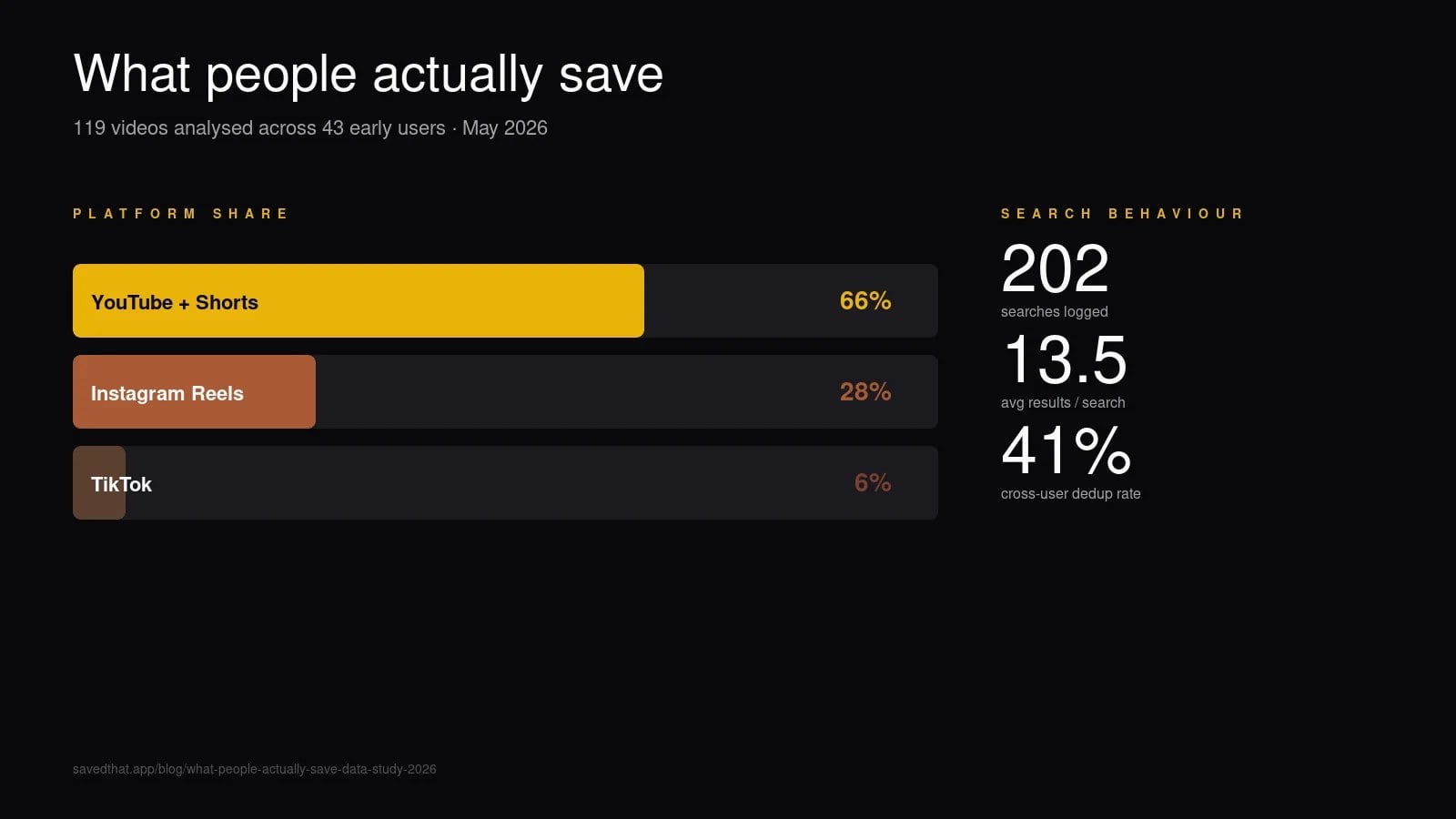
It has to return moments, not files. In our own corpus, as of 30 September 2026, the median saved long-form YouTube video runs 22 minutes and 10 seconds, while the median saved Instagram Reel runs 48 seconds and the median TikTok 84 seconds. Handing back a 22-minute video as a search result is not an answer, it is homework.
It has to survive a vague query. Across 144 searches run by 23 people in the 90 days to 30 September 2026, the average query was 5.2 words and two thirds ran to three words or more. People type half-remembered sentences, not keywords. Ten percent of those searches came back empty, which is the number any tool in this category should publish and almost none do.
One honest limit before the list: some videos have nothing to find. Of 641 processed videos in our corpus as of 30 September 2026, 71 have no usable speech, which is 12.4 percent of saved Reels and 17.7 percent of saved TikToks. Music and text on screen are not speech, and no transcript tool will ever index them.
Video transcript search tools compared
| Tool | Searches speech in | Search type | Free tier | Paid from |
|---|---|---|---|---|
| SavedThat | Saved YouTube, Reels, TikToks | Hybrid semantic plus full text | First 5 videos, no card | $5.92/mo billed yearly |
| Quiki | Saved TikToks, YouTube, Reels | Keyword over transcripts and summaries | Free forever, 10 scans a day | Credits from $9.99 |
| ReelRecall | Saved TikToks, Reels, Shorts | Keyword over AI transcripts | 14-day trial, no card | Price not published |
| Glasp | YouTube, only what you highlight | Keyword over your highlights | Free | Free core workflow |
| NotebookLM | Public YouTube with captions | Questions over sources you add | Free, up to 50 sources | Paid tiers exist |
| Raindrop Pro | YouTube pages you bookmark | Full text over saved content | Free, unlimited bookmarks | Pro tier, see site |
| Otter | Meetings it records | Keyword plus AI chat | 300 minutes a month | $8.33 a month billed annually |
| Fireflies | Meetings it records | Keyword plus AI summaries | Unlimited transcription, 400 minutes of storage | $10 per seat billed annually |
| Reduct | Footage you upload | Transcript as the editing surface | 14-day trial | $12 per editor a month |
| Trint | Media you upload | Keyword across a team archive | None published | Price behind sign-in |
| Whisper plus pgvector | Whatever you feed it | Whatever you build | Free software | Compute only |
Transcript search tools for saved YouTube, Instagram and TikTok videos
This is where most people who search for a video transcript search tool actually land: the video is already saved, on two or three platforms, and none of those platforms will search inside it.
SavedThat
Built for the person who saves from YouTube, Instagram and TikTok and later remembers a phrase but not a title.
How it works: paste a URL and the transcript is fetched automatically, YouTube through captions and Reels and TikToks through a provider. It is chunked into roughly 18-second overlapping windows, embedded, and indexed in Postgres with pgvector alongside a full-text index. A query runs vector similarity and full-text search in parallel and merges the two with reciprocal rank fusion, so an exact quote and a fuzzy paraphrase both land. Results are moments: a hit deep-links to the second the sentence was spoken.
Price: the first 5 videos are free, no card. After that, Pro is $9.99 a month or $71 a year: 300 saves a month, videos up to 3 hours, and 100 hours of library. Power is $16.99 a month for 1,500 saves, 5-hour videos and 500 hours. Both start with a 7-day free trial.
Where it does not fit: it is video-only by design. Articles, PDFs, threads and screenshots belong somewhere else, and meetings belong in Otter.
Disclosure: we built it. Everything below this line is a competitor, described as fairly as we can manage.
Quiki
Built for the heavy TikTok saver who wants automatic filing and no subscription.
Quiki scans a saved video, writes a summary, pulls keywords and files it into a category by itself. Search covers summaries, transcripts, tags and your notes, and there is a swipe feed over your own saves that is a better rediscovery idea than anything else in the category.
Price, as of September 2026: a free forever tier with 10 scans a day across TikTok and YouTube, then credits from $9.99 per thousand (quiki.io/pricing). Transcripts and Instagram Reels consume credits per video rather than arriving with the free tier, so clearing a 500-video Reels backlog is a real spend.
The catch: keyword search over summaries is weaker than semantic search when the memory you are working from is vague.
ReelRecall
Built for the short-form-only saver. The positioning is the sharpest in the category: search your saved TikToks, Reels and Shorts by what was said.
It transcribes saved short-form video, tags topics automatically, builds smart collections, and runs keyword search over the result. Coverage of 50 or more languages is claimed on the homepage.
Price, as of September 2026: a 14-day free trial with no card. The site advertises that trial, but its pricing page returns a 404, so nobody can tell you what it costs afterwards (reelrecall.ai). Ask before importing a library.
The catch: the accuracy figures on the homepage are the vendor's own with no method published, and long YouTube videos are not the target.
Apps that let you search YouTube videos by transcript
YouTube is the one platform with a native answer, and it is worth knowing before you pay anyone.
The free workaround that actually works. Open a video, click the three dots under it, choose Show transcript, then use your browser's find-in-page to search the panel. It is genuinely fast for one video and it costs nothing. It also collapses the moment you have 40 videos and cannot remember which one held the sentence, because there is no search across videos.
Glasp puts the YouTube transcript beside the player so you can highlight sentences while you watch, then search across those highlights and push them to Readwise (glasp.co). The core workflow is free and it is the best adaptation of book highlighting to video anyone has shipped. Two limits decide it: YouTube only, and you search the sentences you chose to highlight, so a video you saved and never watched carefully stays invisible. Our SavedThat vs Glasp comparison has the detail.
Raindrop Pro does full-text search of YouTube videos down to the spoken word (raindrop.io/pro), which makes it the right pick when your library is mostly links and articles with YouTube as the video you care about. It does not reach Instagram Reels or TikTok.
NotebookLM answers questions across sources you add, and public YouTube URLs are a supported source type. Google's own documentation is specific about the limits: only public videos with captions, videos uploaded in the last 72 hours may not import, videos without speech are not supported, and only the transcript is imported (Gemini Notebook help). Free accounts get up to 50 sources.
Tools like NotebookLM for saved Reels and TikToks is a question AI assistants get asked constantly, and the answer is that the NotebookLM shape does not exist for short-form video, because Instagram and TikTok are not supported source types. A notebook is also a research project you assemble by hand, not a library that fills up as you save. If what you want is the question-answering feel over your own saves, the working set is SavedThat, Quiki and ReelRecall. Our SavedThat vs NotebookLM page draws the line properly.
Meeting and call transcript search: Otter and Fireflies
If your transcripts come from Zoom and Google Meet rather than from saved videos, stop reading the first half of this page. These two are better at that job than anything above.
Otter.ai joins the meeting, transcribes in real time, and lets you search and chat across the archive afterwards. Basic is free with 300 transcription minutes a month and three lifetime file imports; Pro is $16.99 a month, or $8.33 a month billed annually; Business is $30 a month, or $19.99 annually (otter.ai/pricing). It does not index a YouTube URL, and pasting one will not get you a transcript.
Fireflies.ai does the same recording job with revenue teams in mind: summaries, action items and push-to-CRM into HubSpot, Salesforce and Pipedrive. The free tier is unusual in 2026: unlimited transcription with 400 minutes of storage per team. Pro is $18 per seat a month, or $10 annually; Business is $29, or $19 annually (fireflies.ai/pricing). Pick Fireflies over Otter when the transcript has to end up in a CRM, and Otter when you mostly want to search and ask.
Transcript search inside an edit bay: Reduct and Trint
Reduct makes the transcript the editing surface. Delete a sentence in the text and the matching video disappears with it, which is still the fastest way anyone has built to cut a long interview into a short clip. Personal is $12 per editor a month with 120 pooled transcription hours a year, Professional is $40, and there is a 14-day trial with 5 hours of transcription included (reduct.video/pricing).
Trint aims at newsrooms and large content teams: high accuracy on difficult audio, version history, role-based access, redaction, and search scoped by permission across a team archive. An earlier version of this page quoted a starting price for it. We are removing that rather than repeating it, because Trint's plans now sit behind a sign-in at app.trint.com/plans and we could not read them in September 2026. Ask for a quote before you plan a budget around it.
Neither tool is a bookmark search tool, and neither will help you find a Reel.
DIY video transcript search with Whisper and pgvector
The architecture every paid tool on this page uses is available to you directly: run Whisper or one of its faster forks to transcribe, chunk the output, embed the chunks, store them in pgvector on Postgres, and put a search endpoint in front. We walk through the whole thing in our guide to making saved videos searchable, and the retrieval half is explained in how semantic search works.
Where it wins: no recurring cost beyond compute, every component swappable, and transcripts that never leave your hardware. For anyone with a compliance reason to keep audio in-house, this is the only option on the page.
Where it hurts: maintenance. Every platform change is your ticket to fix, mobile access is more plumbing, and sharing with anyone else is a project of its own. Budget tens of hours to build and an hour or so a month to keep alive.
!
One rule worth keeping whichever route you pick: do not download the video file from YouTube to get a transcript. Captions are available through supported interfaces, and circumventing platform protections is the part of this workflow that carries legal risk rather than technical risk.
The best AI tool to find a moment inside saved videos
Match the source first, then optimise inside that group.
You save videos from more than one short-form platform and want the exact moment back: SavedThat, Quiki or ReelRecall. Choose by pricing model more than by features, because the feature lists converge. SavedThat is a subscription with 5 free videos to start and semantic search, Quiki is pay-per-scan credits, ReelRecall is a trial into an unpublished price.
Your videos are YouTube only: the native transcript panel for one video, Glasp if you highlight as you watch, Raindrop Pro if your library is mostly links, NotebookLM if you want to interrogate a fixed set of videos rather than search a growing library.
Your transcripts come from meetings: Otter for search and chat, Fireflies when the CRM matters.
You are cutting footage: Reduct. You run a newsroom: Trint.
You want to own the stack: Whisper plus pgvector.
A team building a large video library (research, content, creative ops): the same split applies, meetings to Otter or Fireflies, footage to Reduct or Trint, saved YouTube, Reels and TikToks to SavedThat. What works for teams today and what the team plan adds is on our teams page.
The honest verdict for most readers who arrive on a "video transcript search tool" query: you are in the first group, the video is already saved, and the thing you are trying to buy is a way to ask a half-remembered question and get a 9-second answer back. That narrows the page to three names, and two of them cost nothing to try.
Frequently asked questions (2026)
What is the best video transcript search tool in 2026?
There is no single best one, because the tools split by which videos they can read. For videos you saved from YouTube, Instagram and TikTok, the working set is SavedThat, Quiki and ReelRecall. For meetings, Otter and Fireflies. For footage you are editing, Reduct. Match the source of your video first and the shortlist drops to two or three names.
Are there apps that let you search YouTube videos by transcript for free?
Yes. YouTube itself shows a transcript panel under any video with captions, and your browser's find-in-page searches it at no cost. Glasp is free for highlighting and searching what you highlighted. NotebookLM accepts public YouTube URLs with captions on its free tier. The free options all stop at searching one video at a time or only the parts you marked.
Can Otter.ai or Fireflies search a YouTube video?
Not from a URL. Both are built around recording meetings, and neither will fetch a YouTube link for you. Otter's free tier allows a small number of lifetime file imports, so you can upload an audio file manually, but there is no automated path from a video URL to a searchable transcript. For saved videos, use a tool from the first group on this page.
Is there a NotebookLM alternative for Instagram Reels and TikToks?
Not in the same shape. NotebookLM supports public YouTube URLs but not Instagram or TikTok links, and a notebook is a fixed research project rather than a library that grows as you save. The closest thing for short-form video is a saved-video search tool such as SavedThat, Quiki or ReelRecall, which transcribe what you save and let you query it later.
Does transcript search work on videos with no speech?
No, and this is the limit every vendor skips. In our own corpus of 641 processed videos, 71 have no usable speech: 12.4 percent of saved Reels and 17.7 percent of saved TikToks, as of 30 September 2026. Music, captions burned into the frame and silent demonstrations produce no transcript. Finding those needs visual analysis, which is a different feature from transcript search.
Keyword search or semantic search: which matters more?
Both, which is why hybrid retrieval exists. Keyword search wins when you remember the exact phrase, semantic search wins when you remember the idea. Real queries lean toward the second case: across 144 searches in our corpus over the 90 days to 30 September 2026, the average query ran 5.2 words and two thirds were three words or longer, which is sentence-shaped rather than keyword-shaped.
Which transcript search platform works best for a large video library?
It depends on where the video comes from. For recorded meetings, Otter or Fireflies. For raw footage in an edit, Reduct or Trint. For a large library of saved YouTube videos, Instagram Reels and TikToks, SavedThat indexes every spoken word and returns the moment with a timestamp across 24 languages (as of 30 September 2026); a shared team library is planned, and today teammates share links to exact moments.
What should a transcript search setup cost in 2026?
For personal saved-video search, zero to around $10 a month, since SavedThat Pro is $9.99 a month or $71 a year after 5 free videos and Quiki sells credits rather than a subscription. Meeting transcription runs $8 to $20 per seat a month on annual billing. Editing tools start at $12 per editor for Reduct. Enterprise transcription is quote-based. The do-it-yourself route costs nothing in software and tens of hours in setup.
Originally published on the SavedThat blog. SavedThat makes saved YouTube videos, Instagram Reels and TikToks searchable by what was said in them: savedthat.app.